
Independent creators
Turn a rough premise into characters, scenes, and a first producible shot.
You can start without experience.
Say what you have in mind. An AI assistant helps you shape the story, define characters, plan shots, and make video clips, one step at a time.
No film-school vocabulary or prompt expertise needed to start. Follow the steps, then fine-tune the details.
Once invited, register and actively claim a 72-hour free trial.

A PATH YOU CAN FOLLOW
Choose a starting point. This interactive illustration shows how a project moves from an input through creative decisions to an individual clip.
YOUR STARTING POINT
A woman misses the last train—and sees someone waiting across the tracks.
Shape the premise, write scenes, choose a character look, then make one shot at a time.
This sample clip was made in the workspace. It does not depict an output generated from the example input above.
01 — 05One decision leads to a producible clip
WHO IT IS FOR
Turn a rough premise into characters, scenes, and a first producible shot.
Explore a product angle and build visual material for a story around it.
Study a reference, rework the idea, and prepare clips for your channels.
Keep scripts, assets, shot plans, prompt versions, and tasks in one project.
Create for audiences on Douyin, WeChat Channels, Xiaohongshu, Kuaishou, and YouTube. Publishing remains your choice and happens outside this workflow.
THE REAL WORKSPACE
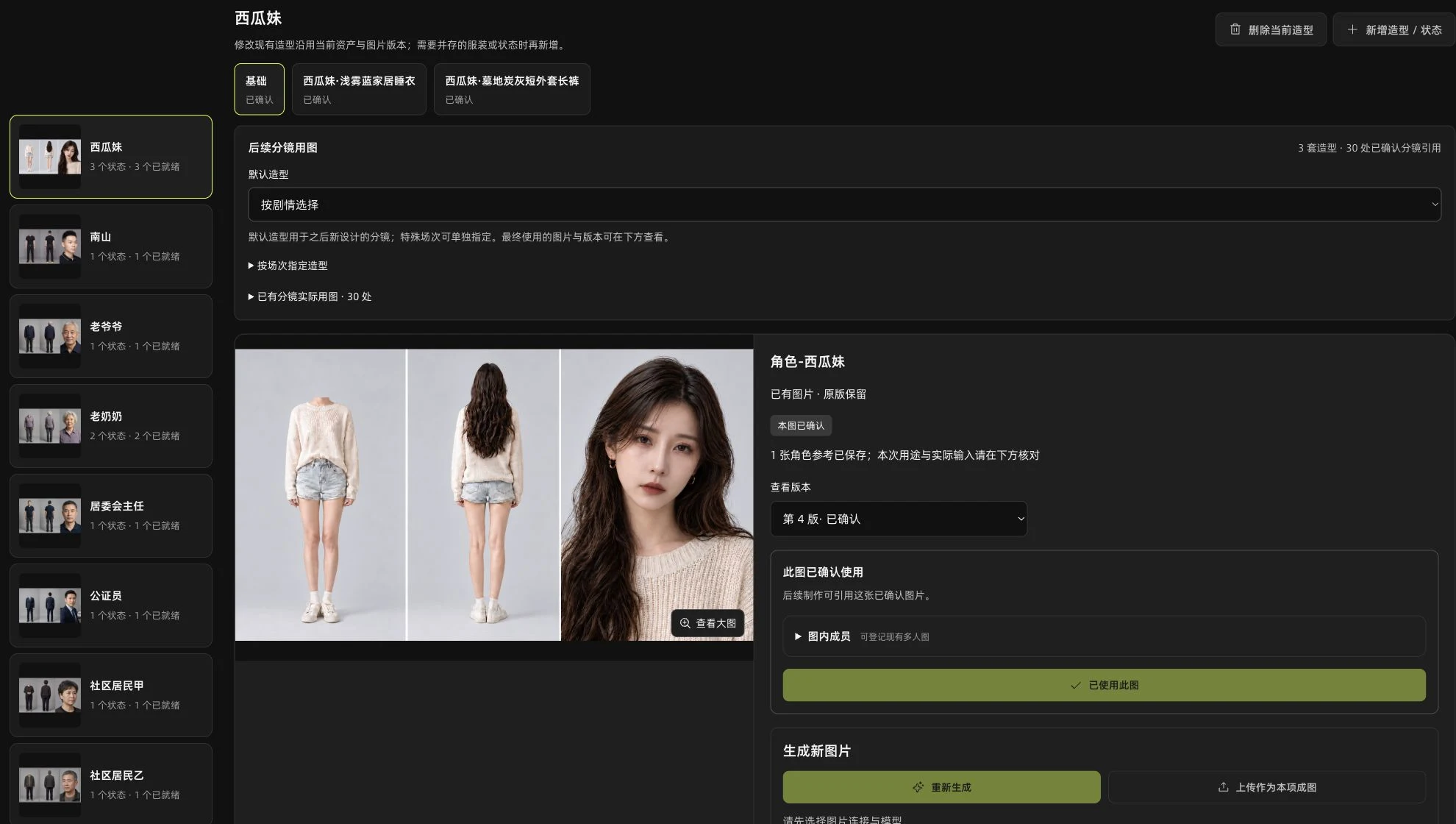
Six views from the working product. Each one answers a different question creators face on the way to a clip.
Reference / WUKONGUse the tabs to browse. Select the image to enlarge it. Open original ↗
01 / 06
Agent / WUKONGUse the tabs to browse. Select the image to enlarge it. Open original ↗
02 / 06
Assets / WUKONGUse the tabs to browse. Select the image to enlarge it. Open original ↗
03 / 06
Shots / WUKONGUse the tabs to browse. Select the image to enlarge it. Open original ↗
04 / 06
Video / WUKONGUse the tabs to browse. Select the image to enlarge it. Open original ↗
05 / 06
Projects / WUKONGUse the tabs to browse. Select the image to enlarge it. Open original ↗
06 / 06
A CREATIVE PARTNER, WITH YOUR APPROVAL
Speak naturally about the story, scene, or current clip. Review the suggestion first; a discussion or saved candidate does not silently rewrite your approved work.
FROM REFERENCE TO YOUR OWN DIRECTION
With a reference you are allowed to use, inspect its characters, plot, shots, and rhythm. Then choose which elements to retain and which to change before developing a new direction.
Reference analysis and remake workflows are available. New remake limits depend on the selected plan; each creative decision remains reviewable.
ACTUAL GENERATED EXCERPTS
Three real silent excerpts made in the workspace, showing a scene, a character, and a performance moment.
WHEN YOU WANT MORE CONTROL
Wukong keeps the beginner path visible while offering detailed choices to creators who need them.
Available model settings and media inputs depend on the connected channel. Generation requires task review, configured services, and separate model charges.
PLANNED, NOT AVAILABLE YET
Extend local Agent connections beyond Codex as those tools become available.
Explore more automation across the steps that currently need review.
Explore ways to create many variations in a reviewed batch.
These are product directions, with no announced release date or promised output volume.
WORKSPACE PLANS
Start with a free trial. Paid plans run for 30 days and renew only when you choose. Prices are in CNY; checkout is not open yet.
¥0/ 72 hours
Claim after your beta invitation and registration.
¥199/ 30 days
Make a reference your own.
¥980/ 30 days
Create more flexibly. Produce more freely.
All paid plans are manual 30-day purchases, with no automatic renewal. Third-party model usage is charged separately. Applying for beta access does not guarantee an immediate invitation.
STORAGE
Add a separate 30-day storage pack to a plan. Packs can be stacked and change storage only, not reference-asset, active-project or new-remake limits.
Specialized services
Discuss your production needs with us. Custom scope & pricing are agreed in conversation.
GOOD TO KNOW
Yes. You can begin with an idea and use the guided stages to develop a story, characters, shots, and individual clips. You still review important creative decisions and model tasks.
It supports reference analysis, creative planning, scripts, visual assets, shot plans, editable prompts, and individual video generation tasks. A complete film still takes selection and assembly beyond those clip tasks.
Professional can start from a sentence or script. Creator starts from a reference work. The workspace helps plan and review visual assets before using them in shots.
Yes, for connected services and supported steps. You can edit prompts, references, shot timing, and available model options. Specific choices vary by channel.
No. Analysis can help you learn from a reference and shape a new work, but audience response depends on the work and distribution. Use material you have the right to use.
Yes. Creating a new remake task uses one allowance, whether or not you finish it. Continuing steps in the same task, even on another day, does not use another new-task allowance. Creator can preview other entry points and complete every operation in that same task. This is a task limit, not a promise of finished videos.
After a beta invitation and registration, you actively claim a 72-hour trial. Creator costs ¥199 and Professional ¥980 for 30 days. Paid plans do not auto-renew; checkout has not opened. Model usage is separate.
We review private beta applications and may email selected applicants. Applying does not guarantee an invitation or a specific response time.
REQUEST PRIVATE BETA ACCESS
Tell us what you want to make. Selected applicants will hear from us by email.
We use your details to review your request and contact you about private beta access. See our Privacy Policy.
KEEP IN TOUCH
Follow the work in progress or email us directly.
